Getting started
Installation
To install Soundata simply do:
pip install soundata
We recommend to do this inside a conda or virtual environment for reproducibility.
Soundata is easily imported into your Python code by:
import soundata
Initializing a dataset
Print a list of all available dataset loaders by calling:
import soundata
print(soundata.list_datasets())
To use a loader, (for example, urbansound8k) you need to initialize it by calling:
import soundata
dataset = soundata.initialize('urbansound8k', data_home='/choose/where/data/live')
You can specify the directory where the Soundata data is stored by passing a path to data_home.
Soundata supports working with multiple dataset versions.
To see all available versions of a specific dataset, run soundata.list_dataset_versions('urbansound8k').
Use version parameter if you wish to use a version other than the default one.
import soundata
dataset = soundata.initialize('urbansound8k', data_home='/choose/where/data/live', version="1.0")
Downloading a dataset
All dataset loaders in soundata have a download() function that allows the user to download:
The canonical version of the dataset (when available).
The dataset index, which indicates the list of clips in the dataset and the paths to audio and annotation files.
The index, which is considered part of the source files of Soundata, is specifically downloaded by running download(["index"]).
Indexes will be directly stored in Soundata’s indexes folder (soundata/datasets/indexes) whereas users can indicate where the dataset files will be stored via data_home.
- Downloading a dataset into the default folder
In this first example,
data_homeis not specified. Thus, UrbanSound8K will be downloaded and retrieved from the default folder,sound_datasets, created in the user’s root folder:import soundata dataset = soundata.initialize('urbansound8k') dataset.download() # Dataset is downloaded into "sound_datasets" folder inside user's root folder
- Downloading a dataset into a specified folder
In the next example
data_homeis specified, so UrbanSound8K will be downloaded and retrieved from the specified location:dataset = soundata.initialize('urbansound8k', data_home='Users/johnsmith/Desktop') dataset.download() # Dataset is downloaded to John Smith's desktop
- Partially downloading a dataset
The
download()function allows to partially download a dataset. In other words, if applicable, the user can select which elements of the dataset they want to download. Each dataset has aREMOTESdictionary were all the available downloadable elements are listed.tau2019uashas different elements as seen in theREMOTESdictionary. You can specify a subset of these elements to download by passing thedownload()function a list of theREMOTESkeys that we are interested in via thepartial_downloadvariable.Example REMOTES
REMOTES = {
"development.audio.1": download_utils.RemoteFileMetadata(
    filename="TAU-urban-acoustic-scenes-2019-development.audio.1.zip",
    url="https://zenodo.org/record/2589280/files/TAU-urban-acoustic-scenes-2019-development.audio.1.zip?download=1",
    checksum="aca4ebfd9ed03d5f747d6ba8c24bc728",
),
"development.audio.2": download_utils.RemoteFileMetadata(
    filename="TAU-urban-acoustic-scenes-2019-development.audio.2.zip",
    url="https://zenodo.org/record/2589280/files/TAU-urban-acoustic-scenes-2019-development.audio.2.zip?download=1",
    checksum="c4f170408ce77c8c70c532bf268d7be0",
),
"development.audio.3": download_utils.RemoteFileMetadata(
    filename="TAU-urban-acoustic-scenes-2019-development.audio.3.zip",
    url="https://zenodo.org/record/2589280/files/TAU-urban-acoustic-scenes-2019-development.audio.3.zip?download=1",
    checksum="c7214a07211f10f3250290d05e72c37e",
),
....
A partial download example for
tau2019uasdataset could be:dataset = soundata.initialize('tau2019uas') dataset.download(partial_download=['development.audio.1', 'development.audio.2']) # download only two remotes
- Downloading a multipart dataset
In some cases, datasets consist of multiple remote files that have to be extracted together locally to correctly recover the data. In those cases, remotes that need to be extracted together should be grouped in a list, so all the necessary files are downloaded at once (even in a partial download). An example of this is the fsd50k loader:
Example multipart REMOTES
REMOTES = {
    "FSD50K.dev_audio": [
        download_utils.RemoteFileMetadata(
            filename="FSD50K.dev_audio.zip",
            url="https://zenodo.org/record/4060432/files/FSD50K.dev_audio.zip?download=1",
            checksum="c480d119b8f7a7e32fdb58f3ea4d6c5a",
        ),
        download_utils.RemoteFileMetadata(
            filename="FSD50K.dev_audio.z01",
            url="https://zenodo.org/record/4060432/files/FSD50K.dev_audio.z01?download=1",
            checksum="faa7cf4cc076fc34a44a479a5ed862a3",
        ),
        download_utils.RemoteFileMetadata(
            filename="FSD50K.dev_audio.z02",
            url="https://zenodo.org/record/4060432/files/FSD50K.dev_audio.z02?download=1",
            checksum="8f9b66153e68571164fb1315d00bc7bc",
        ),
        download_utils.RemoteFileMetadata(
            filename="FSD50K.dev_audio.z03",
            url="https://zenodo.org/record/4060432/files/FSD50K.dev_audio.z03?download=1",
            checksum="1196ef47d267a993d30fa98af54b7159",
        ),
        download_utils.RemoteFileMetadata(
            filename="FSD50K.dev_audio.z04",
            url="https://zenodo.org/record/4060432/files/FSD50K.dev_audio.z04?download=1",
            checksum="d088ac4e11ba53daf9f7574c11cccac9",
        ),
        download_utils.RemoteFileMetadata(
            filename="FSD50K.dev_audio.z05",
            url="https://zenodo.org/record/4060432/files/FSD50K.dev_audio.z05?download=1",
            checksum="81356521aa159accd3c35de22da28c7f",
        ),
    ],
    ...
- Working with non-available datasets to openly download
Some datasets are private, and therefore it is not possible to directly retrieve them from an online repository. In those cases, the download function will only download the index file, and if available, the dataset parts that are not private (for some cases, the annotations are available but not the audio). The user will have to gather the private data themselves, store it in the preferred
data_homelocation, and then initialize the dataset as usual, indicating the data location in thedata_homeparameter.Note
Private datasets may be available to the public upon request. If you are interested in a dataset that is not openly available, please contact the dataset authors or the dataset maintainers to request access.
Validating a dataset
Using the validate() method you can ensure that the files in our local copy of a dataset are identical to the canonical version
of the dataset. The function computes the md5 checksum of every downloaded file to ensure it was downloaded correctly and isn’t corrupted.
For big datasets: In future soundata versions, a random validation will be included. This improvement will reduce validation time for very big datasets.
Accessing annotations
You can choose a random clip from a dataset with the choice_clip() method.
Example Index
dataset = soundata.initialize('urbansed')
random_clip = dataset.choice_clip()
print(random_clip)
>>> Clip(
      audio_path="/Users/theuser/sound_datasets/urbansed/audio/test/soundscape_test_bimodal73.wav",
      clip_id="soundscape_test_bimodal73",
      jams_path="/Users/mf3734/sound_datasets/urbansed/annotations/test/soundscape_test_bimodal73.jams",
      txt_path="/Users/mf3734/sound_datasets/urbansed/annotations/test/soundscape_test_bimodal73.txt",
      audio: The clips audio
                * np.ndarray - audio signal
                * float - sample rate,
      events: The audio events
                * annotations.Events - audio event object,
      split: The data splits (e.g. train)
                * str - split,
    )
You can also access specific clips by id. The available clip ids can be accessed by doing dataset.clip_ids.
In the next example we take the first clip id, and then we retrieve its tags
annotation.
dataset = soundata.initialize('urbansound8k')
ids = dataset.clip_ids  # the list of urbansound8k's clip ids
clips = dataset.load_clips()  # Load all clips in the dataset
example_clip = clips[ids[0]]  # Get the first clip

# Accessing the clip's tags annotation
example_tags = example_clip.tags
print(example_tags)
>>>> Tags(confidence, labels, labels_unit)
print(example_tags.labels)
>>>> ['children_playing']
You can also load a single clip without loading all clips in the dataset:
ids = dataset.clip_ids  # the list of urbansound8k's clip ids
example_clip = dataset.clip(ids[0])  # load this particular clip
example_tags = example_clip.tags  # Get the tags for the first clip
Accessing data remotely
Annotations can also be accessed through load_*() methods which may be useful, for instance, when your data aren’t available locally.
If you specify the annotation’s path, you can use the module’s loading functions directly. Let’s
see an example.
Accessing annotations remotely example
# Load list of clip ids of the dataset
ids = dataset.clip_ids

# Load a single clip, specifying the remote location
example_clip = dataset.clip(ids[0], data_home='remote/data/path')
audio_path = example_clip.audio_path

print(audio_path)
>>> remote/data/path/audio/fold1/135776-2-0-49.wav
print(os.path.exists(audio_path))
>>> False

# Write code here to download the remote path, e.g., to a temporary file.
def my_downloader(remote_path):
    # the contents of this function will depend on where your data lives, and how permanently you
    # want the files to remain on your local machine. We point you to libraries handling common use cases below.
    # for data you would download via scp, you could use the [scp](https://pypi.org/project/scp/) library
    # for data on google drive, use [pydrive](https://pythonhosted.org/PyDrive/)
    # for data on google cloud storage use [google-cloud-storage](https://pypi.org/project/google-cloud-storage/)
    return local_path_to_downloaded_data

# Get path to where your data live
temp_path = my_downloader(audio_path)

# Accessing the clip audio
example_audio = dataset.load_audio(temp_path)
Annotation classes
soundata defines annotation-specific data classes such as Tags or Events. These data classes are meant to standardize the format for
all loaders, so you can use the same code with different datasets. The list and descriptions of available annotation classes can be found in Annotations.
Note
These classes are standardized to the point that the data allow for it. In some cases where the dataset has its own idiosyncrasies, the classes may be extended e.g. adding a customize, uncommon attribute.
Iterating over datasets and annotations
In general, most datasets are a collection of clips, and in most cases each clip has an audio file along with annotations.
With the load_clips() method, all clips are loaded as a dictionary with the clip id as keys and
clip objects as values. The clip objects include their respective audio and annotations, which are lazy-loaded on access
to keep things speedy and memory efficient.
dataset = soundata.initialize('urbansound8k')
for key, clip in dataset.load_clips().items():
    print(key, clip.audio_path)
>>>> soundscape_train_bimodal0 /Users/mf3734/sound_datasets/urbansed/audio/train/soundscape_train_bimodal0.wav
     .....
Alternatively, you can loop over the clip_ids list to directly access each clip in the dataset.
dataset = soundata.initialize('urbansound8k')
for clip_id in dataset.clip_ids:
    print(clip_id, dataset.clip(clip_id).audio_path)
>>>> soundscape_train_bimodal0 /Users/mf3734/sound_datasets/urbansed/audio/train/soundscape_train_bimodal0.wav
     .....
Including soundata in your pipeline
If you wanted to use urbansound8k to evaluate the performance of an urban sound classifier,
(in our case, random_classifier), and then split the scores based on the metadata, you could do the following:
soundata usage example
import sed_eval
import soundata
import numpy as np
from dcase_util.containers import MetaDataContainer, ProbabilityContainer

def random_classifier(classes):
    return [np.random.random(1)[0] for c in classes]

# Evaluate on the full dataset
dataset = soundata.initialize('urbansound8k')
scores = {}
data = dataset.load_clips()

classes = np.unique([c for _, clip_data in data.items() for c in clip_data.tags.labels])
fold = 2  # Choose a fold to evaluate

ref_tags, est_tags, est_tag_probs = [], [], []
for id, clip in data.items():
    if clip.fold == 2:
        ref_tags.append({'filename': id, 'tags': clip.tags.labels[0]})  # Urbansound8k has one label per clip
        probs = random_classifier(classes)
        for c, p in zip(classes, probs):
            est_tag_probs.append({'filename': id, 'label': c, 'probability': p},)
            if p > 0.5:  # Detection threshold of 0.5
                est_tags.append({'filename': id, 'tags': [c]})

tag_evaluator = sed_eval.audio_tag.AudioTaggingMetrics(tags=MetaDataContainer(ref_tags).unique_tags)
tag_evaluator.evaluate(
    reference_tag_list=MetaDataContainer(ref_tags),
    estimated_tag_list=MetaDataContainer(est_tags),
    estimated_tag_probabilities=ProbabilityContainer(est_tag_probs))
This is the result of the example above:
Example result
print(tag_evaluator)
>>> Audio tagging metrics
========================================
  Tags                              : 10
  Evaluated units                   : 888

  Overall metrics (micro-average)
  ======================================
  F-measure
    F-measure (F1)                  : 9.57 %
    Precision                       : 9.57 %
    Recall                          : 9.57 %
  Equal error rate
    Equal error rate (EER)          : 51.01 %

  Class-wise average metrics (macro-average)
  ======================================
  F-measure
    F-measure (F1)                  : 6.47 %
    Precision                       : 7.54 %
    Recall                          : 9.33 %
  Equal error rate
    Equal error rate (EER)          : 50.95 %

  Class-wise metrics
  ======================================
    Tag               | Nref        Nsys      | F-score     Pre         Rec       | EER
    ----------------- | ---------   --------- | ---------   ---------   --------- | ---------
    air_conditioner   | 100         419       | 19.3%       11.9        50.0      | 49.0%
    car_horn          | 42          227       | 4.5%        2.6         14.3      | 54.8%
    children_playing  | 100         126       | 9.7%        8.7         11.0      | 54.0%
    dog_bark          | 100         58        | 13.9%       19.0        11.0      | 47.1%
    drilling          | 100         31        | 9.2%        19.4        6.0       | 52.4%
    engine_idling     | 100         16        | 1.7%        6.2         1.0       | 50.0%
    gun_shot          | 35          7         | 0.0%        0.0         0.0       | 48.1%
    jackhammer        | 120         1         | 0.0%        0.0         0.0       | 52.5%
    siren             | 91          3         | 0.0%        0.0         0.0       | 51.6%
    street_music      | 100         0         | nan%        nan         0.0       | 50.0%
Using soundata with tensorflow
The following is a simple example of a generator that can be used to create a tensorflow Dataset.
soundata with tf.data.Dataset example
import soundata
import numpy as np
import tensorflow as tf

def data_generator(dataset_name):
    # using the default data_home
    dataset = soundata.initialize(dataset_name)
    ids = dataset.clip_ids()
    for clip_id in ids:
        clip = dataset.clip(clip_id)
        audio_signal, sample_rate = clip.audio
        yield {
            "audio": audio_signal.astype(np.float32),
            "sample_rate": sample_rate,
            "label": clip.tags.labels[0],
            "metadata": {"clip_id": clip.clip_id, "fold": clip.fold}
        }

dataset = tf.data.Dataset.from_generator(
    data_generator('urbansound8k'),
    {
        "audio": tf.float32,
        "sample_rate": tf.float32,
        "label": tf.string,
        "metadata": {'clip_id': tf.string, 'fold': tf.string}
    }
)
In future soundata versions, generators for Tensorflow and PyTorch will be included out-of-the-box.
Using soundata to explore dataset
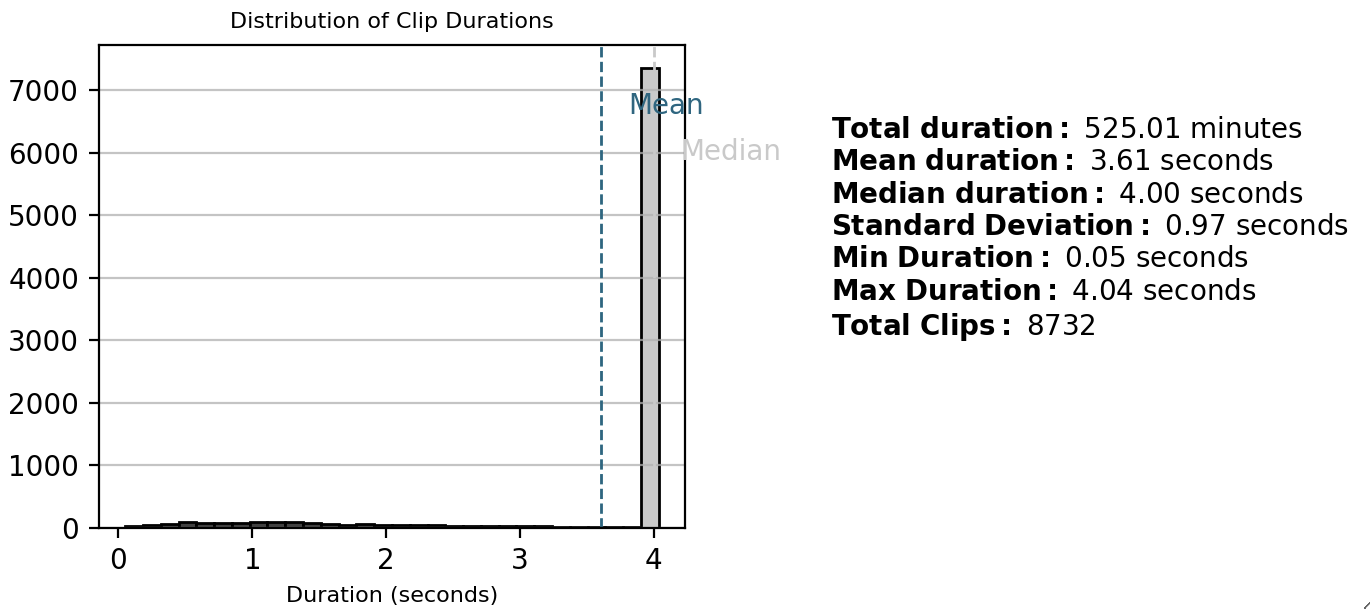
The explore_dataset() function in soundata allows you to visualize various aspects of the dataset. This can be particularly useful for understanding the distribution of events and the nature of the audio data before proceeding with analysis or model training.
Using explore_dataset() to Visualize Data in Jupyter Notebook
If you want to use the plot functionalities used in display_plot_utils.py you must install the optional dependencies too:
pip install soundata"[plots]"
If you try to load the visualizations without the optional dependencies, you will be thrown an exception indicating that the dependencies are missing. Please do install the optional dependencies using the command above in order to use the visualization functionalities.
Note
If you encounter any error during the installation of simpleaudio, please visit simpleaudio installation guide and check the dependencies.
To explore the dataset, first initialize it and then call the explore_dataset() method:
import soundata

# Initialize the dataset
dataset = soundata.initialize('urbansound8k', data_home='your_data_directory')

# Explore the dataset
dataset.explore_dataset()
When you run this function, an interface will appear with several options, allowing you to choose what to plot.

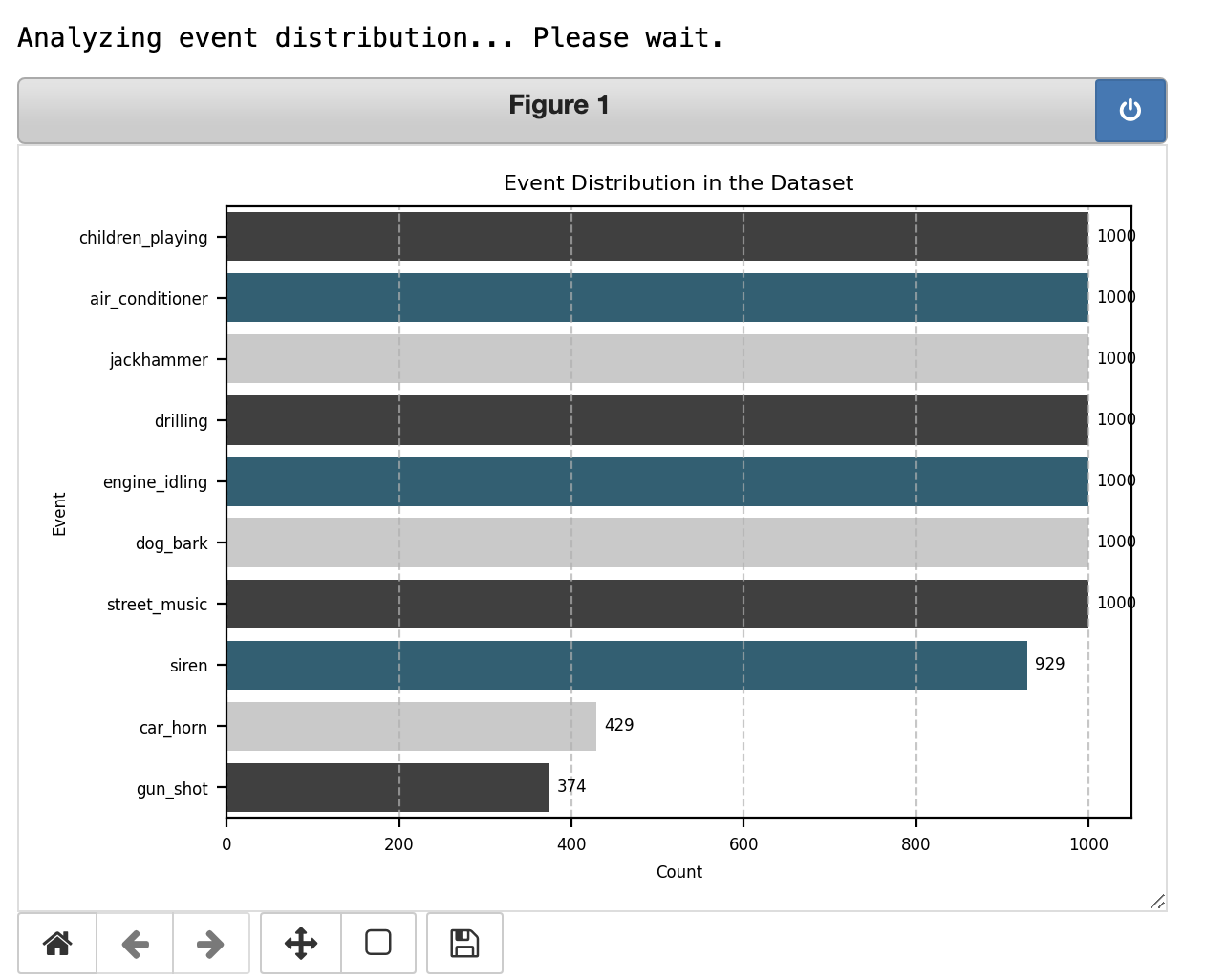
Statistics (Computational)
Provides computational statistics about the dataset (Time-consuming operation).
Audio Visualization
Offers visualizations related to the audio data, such as waveforms or spectrograms.

By using the explore_dataset() function, you can gain a comprehensive overview of the dataset’s structure and content, which is crucial for effective analysis and model building.